Hydra Tool v2026.3.21.0 Download Full Activated Version [Latest]
Is your Android Phone stuck on FRP lock or facing software problems after an update? Fixing the issue is very difficult without the right software. Repairing Android phones from different brands can be time-consuming, especially when dealing with FRP locks, firmware errors, boot loops, or screen locks. Hydra Tool simplifies these repair tasks with a single professional solution that supports thousands of Android devices.
Also Use: Android Multi Tool v1.3.5.7 Download Activated [Tested Version]
What is Hydra Tool?
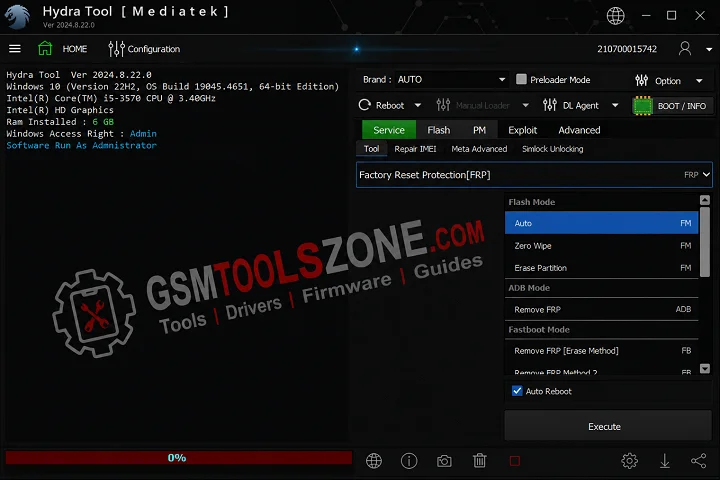
Hydra Tool 2026.3.21.0 is a professional Windows-based software. It helps users and mobile technicians flash firmware, remove FRP locks, unlock devices, repair IMEI numbers, fix software issues, manage partitions, and read device information. Hydra Tool has a simple interface that is easy for users and mobile technicians. Hydra Tool supports Qualcomm, MediaTek (MTK), and Spreadtrum (Unisoc) chipsets and works with popular brands like Xiaomi, Samsung, OPPO, Vivo, Realme, Huawei, Motorola, Infinix, Tecno, Nokia, and Lenovo.
Features
Multi-Chipset Support:
Hydra Tool supports Qualcomm, MediaTek (MTK), and Spreadtrum (Unisoc) chipsets. This wide compatibility allows you to repair, unlock, and flash a large number of Android smartphones from different brands.
Device Unlocking:
The tool helps remove FRP lock, pattern lock, PIN lock, password lock, and screen lock on supported devices. It makes the unlocking process simple and fast for mobile technicians.
Firmware Flashing:
Hydra Tool lets you flash stock firmware to fix software problems, restore factory firmware, upgrade or downgrade Android versions, and recover devices affected by firmware corruption or boot issues.
Device Information Reader:
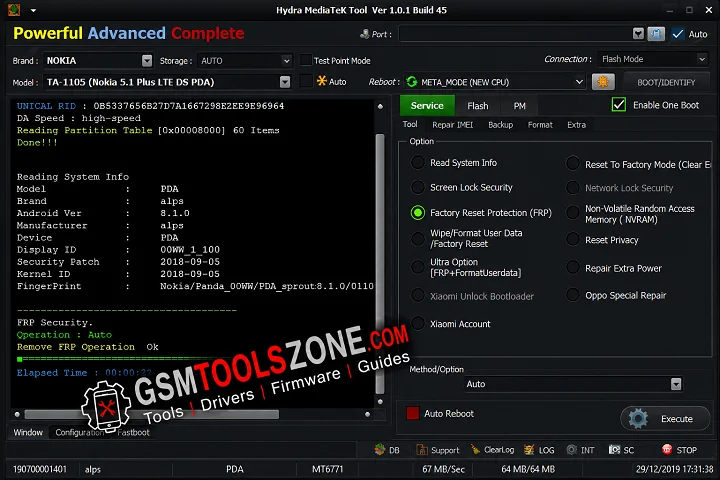
You can read detailed device information, including device model, Android version, chipset, firmware version, security status, and boot mode. This helps technicians identify devices before performing repairs.
Boot Mode Detection:
The tool automatically detects different boot modes such as Fastboot Mode, Recovery Mode, Bootloader Mode, and Preloader Mode, making it easier to connect and service Android devices.
Software Repair:
Hydra Tool fixes common Android software issues, including boot loops, system crashes, firmware errors, and software corruption, helping restore devices to normal working condition.
Partition Management:
Advanced users can read, backup, restore, and manage device partitions for firmware flashing, software repair, and other servicing tasks.
User-Friendly Interface:
Hydra Tool features a clean dashboard, simple navigation, and organized modules. Its easy-to-use interface allows both beginners and professional mobile technicians to perform Android repair tasks efficiently.
What’s new in Hydra Tool Latest Version 2026.3.21.0?
- Digital Subscription Support: Use Hydra Tool with a digital license. No hardware dongle is required.
- Better Performance: Improved speed, stability, and overall performance for smoother Android servicing.
- Expanded Device Support: Added new device loaders, support for more Android devices, and improved compatibility.
- Bug Fixes: Fixed various bugs to improve reliability, stability, and the user experience.
System Requirement:
- Operating System: Windows 7, 8, 10, or 11 (32-bit & 64-bit)
- Processor: Intel or AMD Processor
- RAM: 4 GB or higher
- Storage: At least 2 GB of free disk space
- USB Port: Required for connecting Android devices
- USB Drivers: Android USB Drivers installed
How To download/Install?
- Download the latest Hydra Tool setup file Below link OR official website.
- Extract the downloaded ZIP file
- Open the extracted folder and run the Setup
- After installation, open the Hydra Tool
- Install the required Android USB Drivers if they are not already installed
- Connect your Android phone with a USB cable
- You are now ready to use the tool.
Setup File Download Information
- File Version: v2026.3.21.0
- File Size: 265.02 MB
- 🗝Password: hydratool
- Download Link👇
Summary
Hydra Tool is a professional Windows-based software for repairing and managing Android devices. It supports many Android brands, including Samsung, Xiaomi, OPPO, Vivo, Realme, Huawei, Motorola, Infinix, and Tecno, as well as Qualcomm, MediaTek (MTK), and Spreadtrum (Unisoc) chipsets. Hydra Tool is a simple interface. Hydra Tool is a good choice for users and mobile technicians.
FAQ’s
Can beginners use Hydra Tool?
Yes. Hydra Tool has a simple interface that makes it suitable for both beginners and professional mobile technicians.
Does Hydra Tool work offline?
Most repair functions can work offline, but an internet connection may be required for license activation, updates, and online services.
Is Hydra Tool safe to use?
Yes. When downloaded from a trusted source and used correctly, Hydra Tool is generally safe for Android servicing and repair.
Can Hydra Tool receive new updates?
Yes. The developers regularly release updates to improve performance, add support for new Android devices, and fix bugs.
Who should use Hydra Tool?
Hydra Tool is designed for mobile repair technicians, service centers, and advanced Android users who need a professional device servicing solution.