Nusantara Unlock Tool Free Download for FRP & Fastboot Latest [2027]
When handling Fastboot operations, firmware issues, and Android repair tasks, using separate tools for different brands and chipsets can make mobile servicing difficult and time-consuming. Nusantara Unlock Tool provides a Windows-based solution that brings multiple mobile servicing functions into one interface. Nusantara Unlock Tool supports selected Android devices from brands such as Xiaomi, OPPO, Vivo, Huawei, and Meizu, with dedicated workflows for Qualcomm and MediaTek chipsets.
Also Use: HakinTool V2 Free Download for Multi-Brand Android Servicing (2027)
What is Nusantara Unlock Tool?
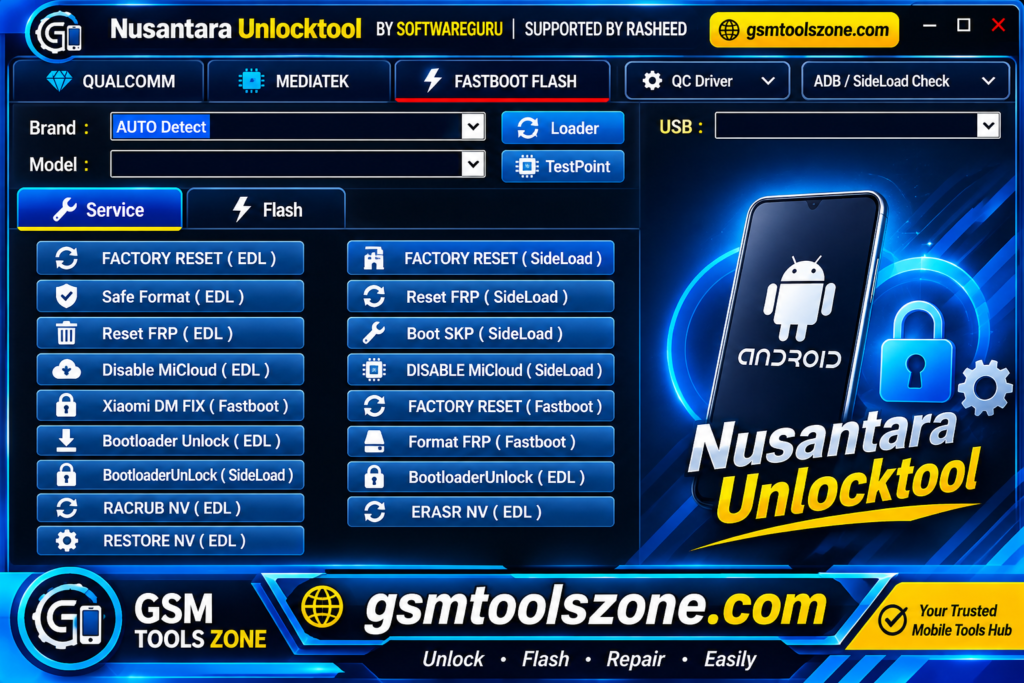
Nusantara Unlock Tool is a Windows-based Android servicing tool designed for mobile technicians and advanced users. It helps perform different device maintenance and repair tasks through Fastboot and ADB modes. Nusantara Unlock Tool supports selected Qualcomm and MediaTek powered devices from popular Android brands such as Xiaomi, OPPO, Vivo, Huawei, and Meizu. Its available functions include FRP reset, IMEI-related servicing, firmware tasks, and device unlocking, depending on the supported model and software version.
Features
FRP Reset:
Provides FRP reset options for supported Android devices through available servicing modes.
Bootloader Unlock:
Includes bootloader unlocking options for selected Xiaomi devices using Fastboot mode.
EDL Flashing:
Allows technicians to flash supported Qualcomm devices in EDL mode with options to select specific firmware partitions.
Fastboot Flashing:
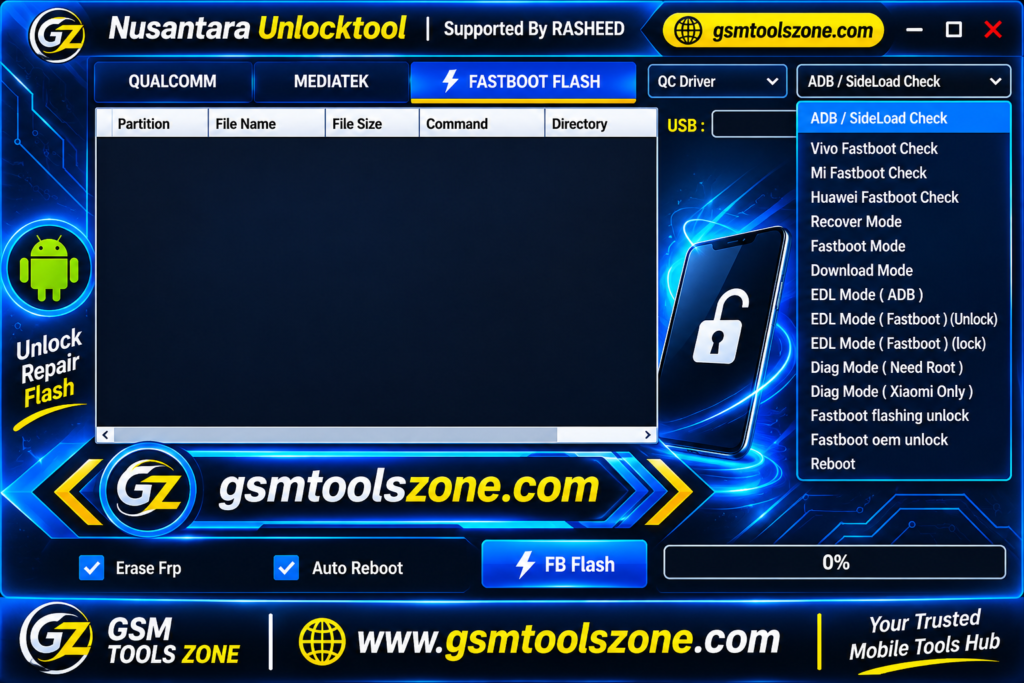
Supports firmware flashing and selected Fastboot operations, including FRP erase and automatic reboot.
MediaTek Auth Bypass:
Includes an Auth Bypass feature for compatible MediaTek devices.
Factory Reset:
Offers factory reset options for supported Qualcomm and MediaTek smartphones.
NV Backup & Restore:
Helps create and restore NV data backups during supported device repair operations.
IMEI & Network Repair:
Includes IMEI-related and network repair options for supported MediaTek devices.
ADB & Sideload:
Supports ADB communication and sideload operations for compatible Android devices.
Multi-Brand Compatibility:
Works with selected Xiaomi, OPPO, Vivo, Huawei, and Meizu devices, depending on chipset and model support.
Pros and Cons
Pros
- Supports both Qualcomm and MediaTek chipsets.
- Includes multiple Android servicing features in one tool.
- Offers Fastboot and EDL flashing options.
- Supports FRP reset on compatible devices.
- Provides NV data backup and restore options.
- Includes ADB and Sideload support.
- Supports selected Xiaomi, OPPO, Vivo, Huawei, and Meizu devices.
Cons
- Not all features work with every Android device.
- Some functions require specific device modes.
- IMEI and network repair options have limited device support.
- Beginners may find some advanced options difficult to use.
- Requires a Windows PC and proper USB drivers.
- Incorrect servicing operations may cause data loss or software issues.
System Requirements
| Requirement | Details |
| Operating System | Windows 7, 8, 10, or 11 |
| RAM | 4 GB |
| Processor | Intel or AMD |
| Storage | 1 GB Free Space |
| USB Drivers | Compatible Android USB drivers |
| USB Connection | Working USB port and cable |
How to download Nusantara Unlock Tool?
- Visit the official website that provides the Nusantara Unlock Tool download.
- Find the latest available version of Nusantara Unlock Tool.
- Click the download button and save the file to your computer.
- If the downloaded file is compressed, extract it using WinRAR or 7-Zip.
- Open the extracted folder and look for the tool’s executable file.
- Install the required USB drivers if they are not already installed.
Setup Download Information
- File Version: Latest 2027
- File Size: 71.11 MB
- File Password: ❌None
- Download Link👇
Conclusion
Nusantara Unlock Tool is a useful, professional, Windows-based solution for mobile technicians who handle Android servicing and repair tasks. It combines several functions, including FRP reset, bootloader unlocking, Fastboot operations, EDL flashing, and MediaTek Auth Bypass, into one tool. Its support for selected Qualcomm and MediaTek devices from brands such as Xiaomi, OPPO, Vivo, Huawei, and Meizu makes it a convenient option for compatible devices. Overall, it is very easy to use you can download this tool and solve your problem in an easy way.
FAQs
Is Nusantara Unlock Tool free to download?
The availability of a free version depends on the release and its source. Always check the download details before installing it.
Which devices are supported by Nusantara Unlock Tool?
It supports selected Android devices from Xiaomi, OPPO, Vivo, Huawei, and Meizu, depending on the model and chipset.
Can Nusantara Unlock Tool remove FRP?
Yes, it includes FRP reset options for compatible Android devices. The available method depends on the device model and Android version.
Does Nusantara Unlock Tool support MediaTek Auth Bypass?
Yes, it includes an Auth Bypass option for selected MediaTek devices.
Is Nusantara Unlock Tool safe to use?
It is important to download the tool from a trusted source and scan the files before running them. Always back up your device data before performing repair operations.

One Comment
Comments are closed.