Mysterious-Dev Tool v1.3.2 Download for Android FRP & Unlocking
When you are facing an Android FRP lock, forgotten screen password, or software problem, Mysterious-Dev Tool v1.3.2 helps mobile technicians solve different Android device problems with one simple Windows tool. Mysterious-Dev Tool v1.3.2 supports FRP removal and pattern, PIN, password, and fingerprint unlocking on supported devices. Mysterious-Dev Tool v1.3.2 also provides ADB mode, Qualcomm EDL, MediaTek BROM, Dead Mode, and Test Point functions. Mysterious-Dev Tool v1.3.2 supports popular brands, including Samsung Exynos FRP, Samsung language translation for Android 11–16, and COM port fixes for Qualcomm and Unisoc devices.
Also Use: TFT MTK Module Tool v7.0.0 Free Download for MediaTek FRP & Firmware Flashing (2027)
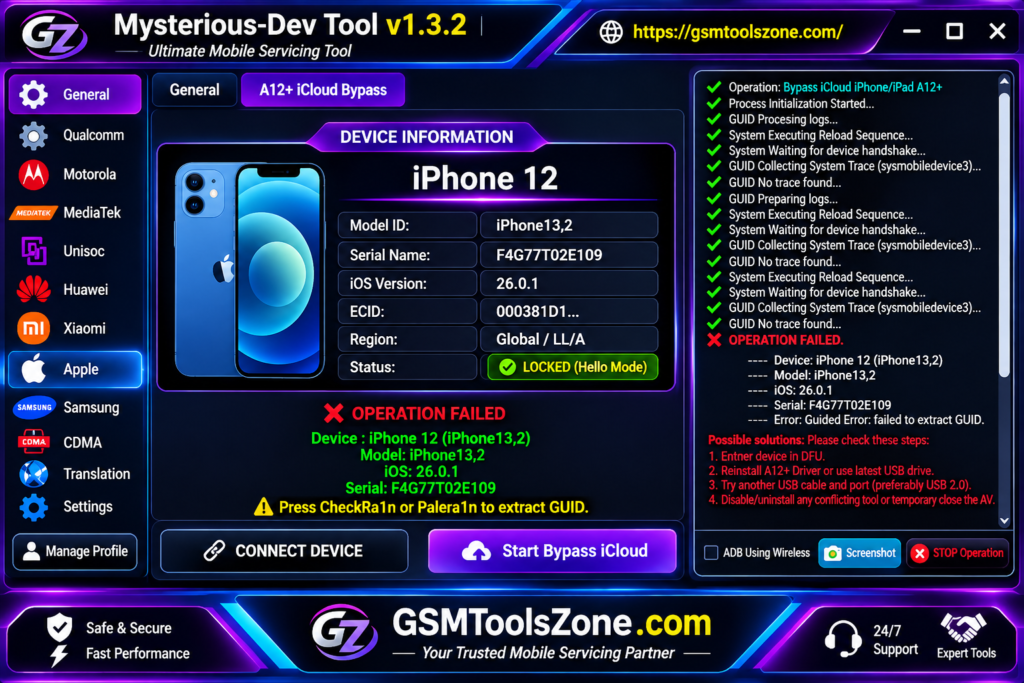
What is Mysterious-Dev Tool v1.3.2?
Mysterious-Dev Tool v1.3.2 is a professional Windows-based tool. It has been developed to solve different Android servicing tasks. This tool supports ADB, Fastboot, EDL, Download Mode, and Emergency Mode. It also includes useful features for FRP removal, firmware flashing, IMEI operations, partition management, and reading device information. This tool has also received different updates to improve Samsung devices and overall usability. This tool supports popular brands Samsung, Qualcomm, MediaTek, Huawei, Xiaomi, and Apple.
Features
ADB & Application Manager:
Manage connected Android devices through ADB. You can read device information, manage applications, and perform supported debugging operations.
Qualcomm EDL & Diag Support:
Supports Qualcomm EDL and Diag modes for firmware flashing, partition management, device diagnostics, and software repair.
MediaTek BROM & Preloader:
Provides MediaTek BROM and Preloader functions, including authentication bypass, flashing, reset, and supported repair operations.
Unisoc Device Support:
Offers flashing and Diag options for supported Unisoc devices. These functions help with resetting, unlocking, and troubleshooting.
Samsung MTP Services:
Provides Samsung servicing options through an MTP USB connection. It helps technicians perform supported device information and maintenance operations.
Huawei Servicing Options:
Includes Huawei software servicing functions such as firmware installation, device formatting, and reset operations.
Motorola Flashing & Unlocking:
Supports firmware flashing and unlocking functions for compatible Motorola devices.
Global Language Translation:
Change the language of supported Android devices without requiring root access.
SIM & Network Services:
Includes SIM unlocking and network-related functions for supported Samsung and other compatible devices.
IMEI & Partition Management:
Provides IMEI-related repair options and partition management features for supported chipsets.
FRP Removal:
Helps remove Google FRP locks from supported Android devices. This feature is useful when a device gets stuck at Google account verification after a factory reset.
Pros and Cons
Pros
- Supports multiple Android brands and chipsets.
- Includes Qualcomm, MediaTek, and Unisoc servicing options.
- Provides useful FRP removal functions.
- Supports ADB, Fastboot, EDL, and other connection modes.
- Includes firmware flashing and partition management features.
- Offers Samsung, Huawei, and Motorola servicing options.
- Provides multiple functions in one Windows application.
Cons
- Some features support only selected device models.
- Requires proper USB drivers for device connections.
- Beginners may need time to understand all functions.
- Some operations require specific device modes.
- Not all features work with every Android version.
System Requirements
| Requirement | Details |
| Operating System | Windows 7, 8, 10, or 11 |
| RAM | 4 GB |
| Processor | Intel or AMD |
| Storage | 1 GB Free Space |
| USB Connection | USB Data Cable |
| Drivers Required | USB and device drivers |
How to download Mysterious-Dev Tool v1.3.2?
- Visit the official website to find the Mysterious-Dev Tool v1.3.2 download file.
- Click the download button and wait for the file to download.
- Once the download is complete, extract the ZIP or RAR file using WinRAR or 7-Zip.
- Open the extracted folder and find the tool setup or executable file.
- Run the file as Administrator.
- Install the required USB drivers if they are not already installed.
Setup Download Information
- File Version: v1.3.2
- File Size: 201.88 MB
- File Password: gsmtoolszone.com
- Download Link👇

Conclusion
Mysterious-Dev Tool v1.3.2 is a useful choice for mobile technicians who work with different Android devices. It offers several features, including FRP removal, firmware flashing, ADB, EDL, Diag, and partition management. This tool supports popular brands and chipsets such as Samsung, Qualcomm, MediaTek, Unisoc, Huawei, and Motorola. Before downloading and using it, make sure your device model and Android version are supported.
FAQs
Which devices are supported by Mysterious-Dev Tool?
It supports selected devices from Samsung, Xiaomi, Huawei, and Motorola, along with other compatible Android brands.
Which chipsets does Mysterious-Dev Tool support?
The tool provides servicing options for Qualcomm, MediaTek, SPD, and Unisoc chipsets.
Can Mysterious-Dev Tool remove FRP locks?
Yes, it includes FRP removal functions for supported Android devices. The available method depends on the device model and security version.
Does Mysterious-Dev Tool support ADB and Fastboot?
Yes, it supports ADB and Fastboot connection modes for reading device information and performing supported servicing operations.
Is Mysterious-Dev Tool free to use?
The official version requires an active license for professional operations. Some advanced services may also require server credits.

One Comment
Comments are closed.