
Chigo Unlocker Tool v3.5 Setup Download 100% Working
Smartphone repair becomes difficult when a device is locked, needs firmware flashing, or has software-related problems. Different chipsets and device modes require different repair tasks, making these tasks time-consuming for mobile technicians. Chigo Unlocker Tool v3.5 provides a practical solution Android repair and unlocking functions into one Windows-based tool. Chigo Unlocker Tool supports MediaTek and Qualcomm devices and includes features for FRP removal, screen lock operations, firmware flashing, Fastboot mode, Qualcomm EDL mode, MediaTek BROM mode, Xiaomi EDL, network-related repair, and partition management.
Also Use: MRT Tool V6.1 Download Latest Version [2026]
What is Chigo Unlocker Tool v3.5?
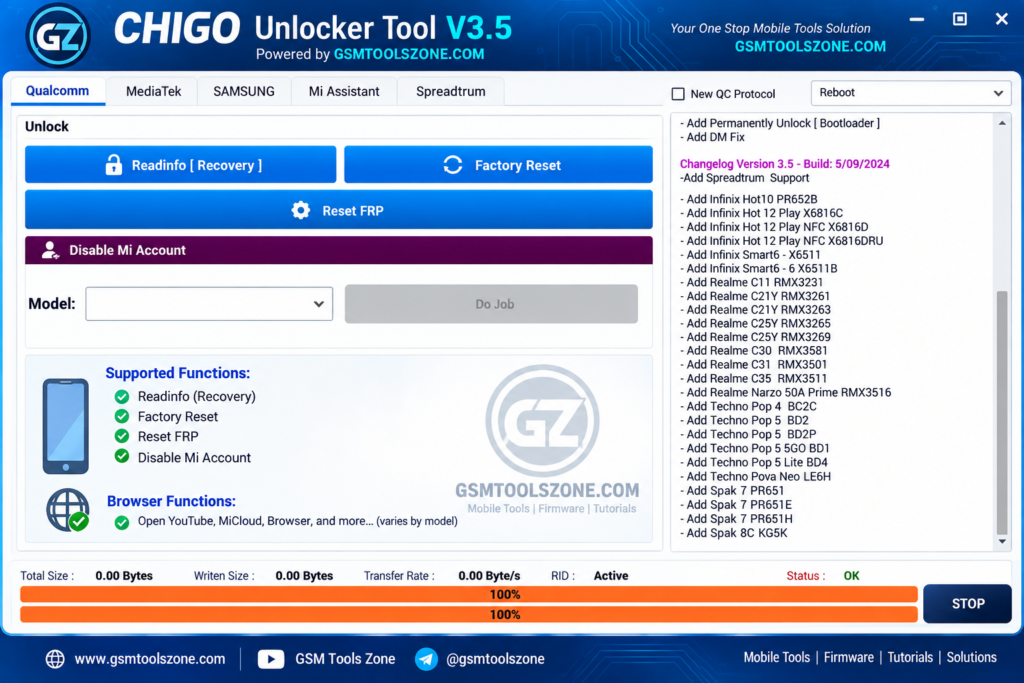
Chigo Unlocker Tool v3.5 is a Windows-based mobile repair software that helps technicians perform different Android servicing tasks from one place. Chigo Unlocker Tool supports MediaTek (MTK) and Qualcomm devices. It provides functions such as FRP reset, factory reset, user lock removal, bootloader operations, EFS management, partition management, and firmware flashing. It also includes support for different device modes, including Fastboot, Qualcomm EDL, and MediaTek BROM. Chigo Unlocker Tool supports popular Android brands, including Xiaomi, OPPO, Realme, Samsung, and Vivo.
Features
Qualcomm EDL Flash:
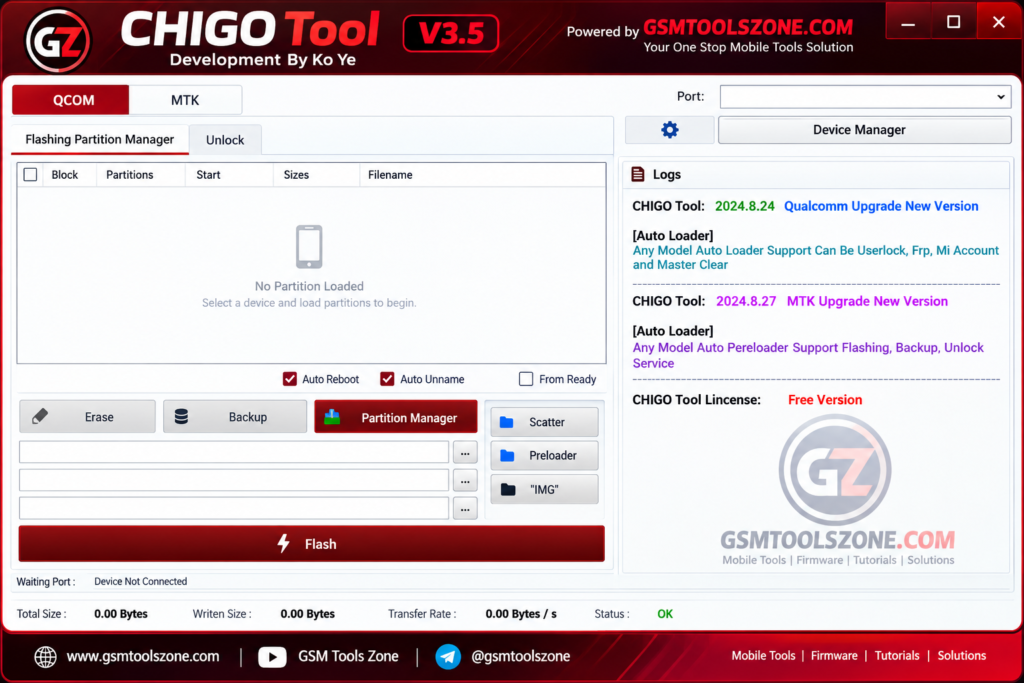
Chigo Unlocker Tool v3.5 supports Qualcomm EDL flashing on compatible devices. Technicians can use this section for firmware flashing, FRP-related operations, userdata management, GPT reading, backup, and supported erase functions.
Fastboot Flash:
The Fastboot section provides options for flashing supported firmware and restarting the device. It can also help technicians reboot compatible devices into different supported modes.
Xiaomi EDL Unlock:
For supported Xiaomi smartphones, the tool provides EDL-based servicing options. These may include factory reset, FRP and EFS-related operations, and supported Mi Cloud servicing functions.
OPPO & Realme Support:
Chigo Unlocker Tool v3.5 offers servicing functions for supported OPPO and Realme devices. Depending on the model, technicians can perform operations such as factory reset and EFS-related reset tasks.
Samsung & Vivo Support:
The tool also provides selected servicing options for Samsung and Vivo smartphones. Supported functions may include device information reading, FRP/EFS operations, data reset, and safe formatting.
Network Repair:
The Network Repair section provides tools for supported network-related operations. It can help technicians access Diag mode and work with QCN and NV data on compatible Qualcomm devices.
MediaTek Functions:
Chigo Unlocker Tool v3.5 includes several MediaTek (MTK) functions for supported smartphones. These include firmware flashing, data or partition operations, backup, partition management, and Preloader-related functions.
Universal BROM Unlock:
The Universal BROM section is designed for supported MediaTek devices. It includes functions such as Auth Bypass, Bootloader Unlock/Relock, DM Fix, and UserLock removal.
Samsung Flashing:
The Samsung flashing section supports MD5 firmware flashing on compatible models. It also provides options such as Auto Reboot and NAND Erase for supported firmware servicing tasks.
Browser & Security Functions:
Chigo Unlocker Tool v3.5 includes useful browser and security-related options. Depending on the connected device, users may access functions such as Settings, Browser, File Manager, ADB, YouTube, Call, Dial Pad, and Store.
Mi Assistant:
The Mi Assistant feature is designed for supported Xiaomi devices working through Recovery mode. It provides additional device servicing options without requiring multiple separate programs.
Pros and Cons
Pros
- Supports both MediaTek and Qualcomm devices.
- Includes multiple repair functions in one tool.
- Supports Xiaomi, OPPO, Realme, Samsung, and Vivo devices.
- Provides EDL, Fastboot, and BROM-related functions.
- Includes firmware flashing and reset options.
- Offers network repair functions for supported devices.
- Useful for mobile technicians and repair shops.
- Easy to use for common Android servicing tasks.
Cons
- Some features work only on supported device models.
- Certain operations may require the correct drivers or device mode.
- Advanced functions can cause software issues if used incorrectly.
- Support may vary depending on the chipset and Android version.
- Some features may require activation or a supported tool version.
System Requirements
| Requirements | Details |
|---|---|
| Operating System | Windows 7, 8, 10, or 11 |
| Processor | Intel or AMD processor |
| RAM | 4 GB or more |
| Storage | At least 1 GB of free space |
| USB Port | Required for connecting Android devices |
How to download the Chigo Unlocker Tool v3.5?
- Visit the official website.
- Click on the Download button to start the download.
- Wait for the download to complete.
- Extract the downloaded ZIP file if it is compressed.
- Open the extracted folder and run the Chigo Unlocker Tool v3.5.
- Install the required USB drivers if your device is not detected.
Setup Download Information
- File Version: V3.5
- File Size: 393.41 MB
- Download Link👇
Conclusion
Chigo Unlocker Tool v3.5 is a useful solution for mobile technicians who need to handle different Android repair, flashing, unlocking, and servicing tasks from one place. It supports MediaTek and Qualcomm devices; this tool provides features such as EDL flashing, Fastboot operations, BROM functions, FRP reset, firmware flashing, partition management, and network repair. Before using this tool, always check device compatibility and install the required USB drivers.
FAQs
Which devices does Chigo Unlocker Tool support?
The tool supports selected Xiaomi, OPPO, Realme, Samsung, and Vivo devices, along with compatible MediaTek and Qualcomm smartphones.
Does Chigo Unlocker Tool support Qualcomm devices?
Yes, it supports selected Qualcomm devices and provides functions such as EDL flashing and other supported servicing operations.
Is Chigo Unlocker Tool easy to use?
The tool provides different functions in one interface, but users should have basic knowledge of Android servicing before using advanced operations.
Does Chigo Unlocker Tool require USB drivers?
Yes, the correct USB and device drivers may be required for the computer to detect the connected smartphone properly.
One Comment
Comments are closed.