BFT Tool v1.8 Setup Download By BossV 2026
Facing Android phone issues like forgotten screen locks, FRP account verification, IMEI errors, bootloader restrictions, or demo/MDM problems? BFT Tool provides a complete Windows-based solution for Android flashing and unlocking tasks. It helps technicians remove supported locks, repair software-related issues, unlock bootloaders, and manage device servicing operations across multiple brands including Oppo, Vivo, Xiaomi, Redmi, Infinix, Tecno, Samsung, Huawei, Realme, and Motorola.
For more tools: gsmtoolszone
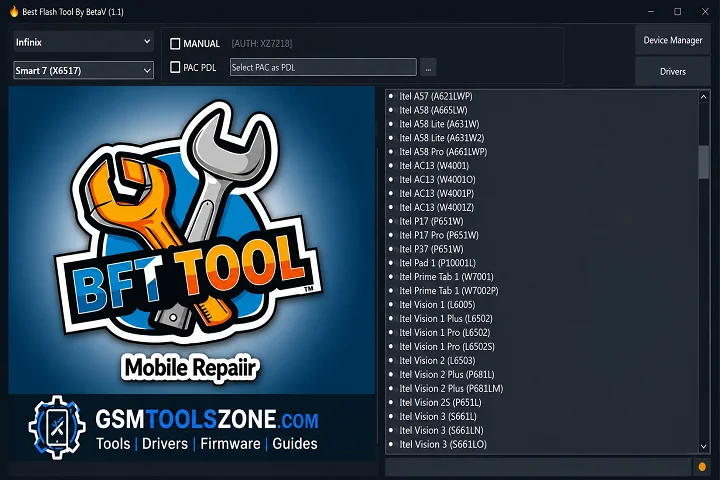
What is BFT Tool?
BFT Tool 1.8 is an Android repair software for Windows that helps users manage, repair, and maintain Android smartphones.BFT Tool combines multiple mobile repair functions in a single tool, so users do not need to install different software for different tasks. It supports many Android brands, including Oppo, Vivo, Tecno, Redmi, Xiaomi, Infinix, Samsung, Huawei, Realme, Metrola, and more.
Features
- Firmware Flashing: Flash and install Android firmware.
- FRP Bypass: Remove Google FRP lock from supported devices.
- Screen Lock Removal: Unlock PIN, Pattern, and Password locks.
- IMEI Repair: Repair or restore IMEI on supported phones.
- ADB & Fastboot Support: Perform advanced Android service operations.
- Qualcomm & MediaTek Support: Compatible with Qualcomm, MediaTek (MTK), and Unisoc (SPD) devices.
- Dead Boot Repair: Fix software-related boot issues.
- Wide Device Compatibility: Supports Samsung, Xiaomi, OPPO, Vivo, Realme, Huawei, Motorola, Infinix, Tecno, and more.
System Requirements
To run BFT Tool on your pc before installing, make sure your PC meets these system requirements:
| Requirement | Specification |
|---|---|
| Operating System | Windows 7, 8, 10, or 11 (32-bit & 64-bit) |
| Processor | Intel or AMD Dual-Core or higher |
| RAM | 4 GB or more (8 GB recommended) |
| Storage | At least 500 MB of free disk space |
| USB Drivers | Android USB and Qualcomm drivers installed |
How To Download, Install & Use BFT Tool v1.8?
- Download and install the BFT Tool Official website.
- Install the required Android USB and Qualcomm USB Drivers.
- Connect your Android phone to the PC using a compatible USB cable.
- Launch the BFT Tool.
- Select the task you want to perform, such as FRP Bypass, Firmware Flashing, Screen Lock Removal, or IMEI Repair.
- Click the Start button to begin the selected operation.
- Wait until the process is completed successfully.
- Once finished, disconnect your device and restart it if required
Setup Download Information
- File Version & Size: | 31 MB || V1.8 |
- File type: compressed / Zip & RAR (Use 7-Zip or WINRAR to unzip the file)
- Support OS: All Windows (32-64 Bit)
- Virus Status: 100% Safe. Scanned By Avast Antivirus
- Your File Password🗝: Gsmtoollab.com
- Download Link👇
Summary
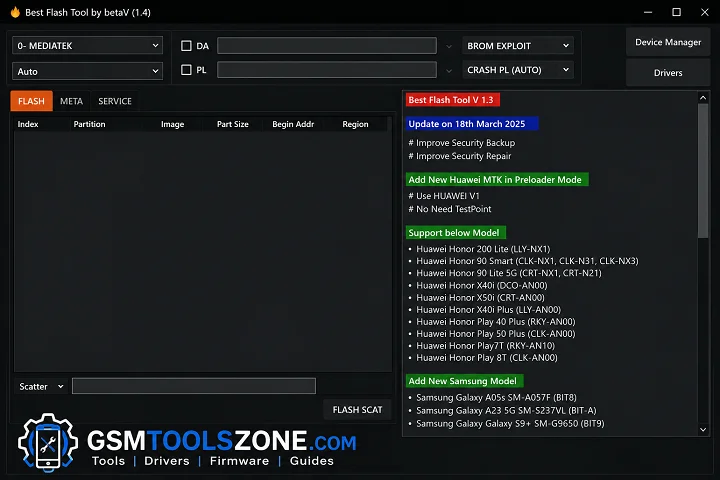
BFT tool is an Android repair solution for users who need to repair and mange on andriod devices. Features like firmware flashing, FRP bypass, screen lock removal, IMEI repair, ADB & Fastboot support, and compatibility with Qualcomm, MediaTek, and Unisoc devices it provides multiple repair functions in one place.BFT tool supports many Android brands and is easy to use. BFT tool is the best choice for Android flashing, unlocking, and software repair tasks.
FAQ’s
Is Best Flash Tool free?
Yes, Best Flash Tool is 100% free to use. No activation fee, no subscription, and no dongle required. Login details are already included inside the tool.
What devices are supported?
It supports Oppo, Vivo, Xiaomi, Infinix, Tecno, Realme, Samsung, Huawei, Motorola, Nokia, and many other Android models.
Does it remove the FRP lock?
Yes, it supports FRP removal for Android devices.
Is it safe to use?
Yes, it is safe if used properly. Always download from trusted sources and disable antivirus software to avoid false detection.