
Dolphin Tool V1.2 Download the Latest Version for Windows
Android users and mobile technicians often face problems such as FRP locks, screen locks, boot loops, failed firmware flashing, Mi Cloud verification, bootloader access, and ADB or Fastboot problems. Dolphin Tool V1.2 helps address these issues by providing multiple Android servicing functions in one Windows software. It supports FRP reset, firmware flashing, device management, and other repair operations through ADB, Fastboot, and MTK Universal modes.
Also Use: V-EMMC Tool v1.0 for Download eMMC Repair [2027]
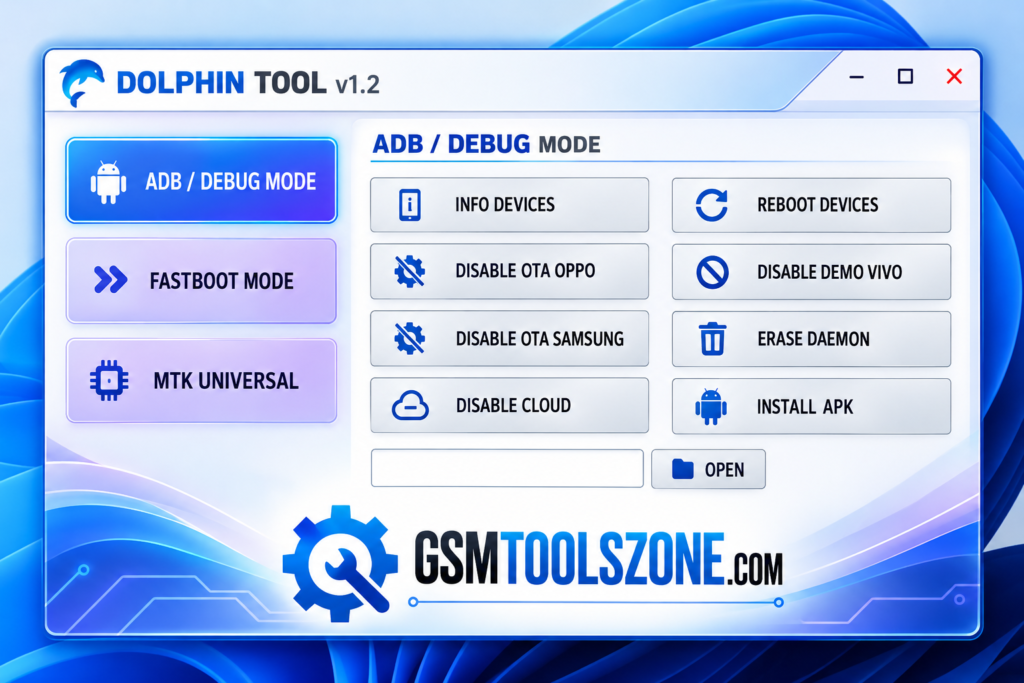
What is Dolphin Tool v1.2?
Dolphin Tool V1.2 is a Windows-based Android repair tool developed by GSM Sulteng. Dolphin Tool v1.2 helps mobile technicians and users perform different servicing tasks, such as FRP reset, screen lock removal, bootloop repair, firmware flashing, and Mi Account management on supported devices. This tool provides three main modes ADB, Fastboot, and MediaTek (MTK). It also includes data backup and restore options and SLA/DA bypass functions for supported devices.
Features
ADB/Debug Mode:
ADB Mode helps users manage connected Android devices through Android Debug Bridge. It provides useful options for device information, rebooting, APK installation, and software troubleshooting. On supported devices, users can also disable OTA updates, remove Vivo Demo Mode, manage cloud services, and erase DAEMON data.
Fastboot Mode:
Fastboot Mode provides access to advanced Android device management functions. Users can check device information, restart the phone into System, Recovery, or Bootloader mode, and perform supported software operations. It also includes options for FRP removal, configuration partition erasing, and user data wiping, which can help prepare a device for firmware-related work.
MTK Universal Mode:
MTK Universal Mode is designed for Android smartphones powered by MediaTek chipsets. It offers servicing options such as SLA/DA protection bypass, factory reset, FRP reset, cloud data formatting, and bootloader unlocking or relocking. Custom partition erasing is also available for supported devices, making this mode useful for technicians working with MTK-based smartphones.
Multiple USB Driver Support:
Dolphin Tool requires the correct drivers to communicate with supported Android devices. Depending on the device and operation, users may need to install the following drivers:
- MTK USB Driver: For MediaTek devices.
- Android USB Driver: For general Android device communication.
- Samsung USB Driver: For supported Samsung smartphones.
- Qualcomm USB Driver: For compatible Qualcomm-based devices and operations.
- USBDK Driver: For supported USB communication functions.
- VCOM Driver: For compatible MediaTek devices in relevant connection modes.
Pros and Cons
Pros
- Supports ADB, Fastboot, and MTK modes.
- Offers multiple Android repair features in one tool.
- Helps with FRP reset and firmware flashing on supported devices.
- Includes useful device management options.
- Supports various MediaTek-based smartphones.
- Has a simple interface for mobile technicians.
Cons
- Requires driver installation before use.
- Some features work only on supported devices.
- Advanced functions may be difficult for beginners.
- Certain operations can erase user data.
- Some functions may not work on devices with newer security patches.
System Requirements
| Requirements | Details |
|---|---|
| Operating System | Windows 7, 8, 10, or 11 |
| Processor | Intel or AMD |
| RAM | 4 GB or more |
| Storage | 1 GB free space |
| USB Connection | USB cable |
| USB Drivers | Required drivers for supported devices |
| Internet Connection | May be required for certain functions |
How to download Dolphin Tool v1.2?
- Visit the official website or a trusted source to download Dolphin Tool V1.2.
- Download the tool files to your computer.
- Extract the ZIP or RAR file using an archive tool such as WinRAR or 7-Zip.
- Install the required USB drivers for your Android device.
- Open the extracted folder and run the tool as administrator if required.
- Connect your Android device to the PC using a USB cable.
Setup Download Information
- File Version: v1.2
- File Size: 21.80 MB
- File Password: gsmtoolszone.com
- Download Link👇
Conclusion
Dolphin Tool V1.2 is a useful Windows application for Android servicing and troubleshooting. Dolphin Tool provides different options for device management, factory reset, FRP reset, firmware flashing, and bootloader operations on supported devices. It supports ADB, Fastboot, and MTK modes, and it helps mobile technicians handle various repair tasks from one place. Its simple interface makes it easier to access the available features. It has a simple interface that everyone can use easily.
FAQs
Is Dolphin Tool V1.2 free to download?
Dolphin Tool V1.2 is listed as a free tool on several third-party websites. Check the download source for its current terms and conditions.
Which operating systems support Dolphin Tool V1.2?
Dolphin Tool is designed for Windows PCs. Check the specific release requirements to confirm compatibility with your Windows version.
Can Dolphin Tool V1.2 remove FRP locks?
The tool includes FRP-related functions for supported devices. Results may vary depending on the phone model, Android version, and security patch.
Can Dolphin Tool V1.2 reset Mi Cloud?
Some versions list Mi Cloud-related reset functions. Availability depends on the supported device and method, so check the tool’s documentation before use.
Is Dolphin Tool V1.2 safe to use?
Safety depends on the download source and the operation performed. Download the files from a trusted source, scan them before opening, and back up important data because some operations can erase your files.
One Comment
Comments are closed.