
Fastboot Flash Tool V1.0.1.2 Full Activated Version 2026
When you are facing a problem with an Android phone stuck in Fastboot mode, facing firmware errors, or failing to start properly. Fastboot Flash Tool V1.0.1.2 is a professional Windows-based tool for working with supported Android devices in Fastboot mode. Fastboot Flash Tool V1.0.1.2 performs functions such as Fastboot Info, Fastboot Error Fix, Fastboot FRP Lock, Fastboot to EDL, Open BAT File, and Open Scatter File. It also supports firmware flashing and partition management for devices.
Also Use: Prime Tool v9.0 Download for Windows Latest Version [2026]
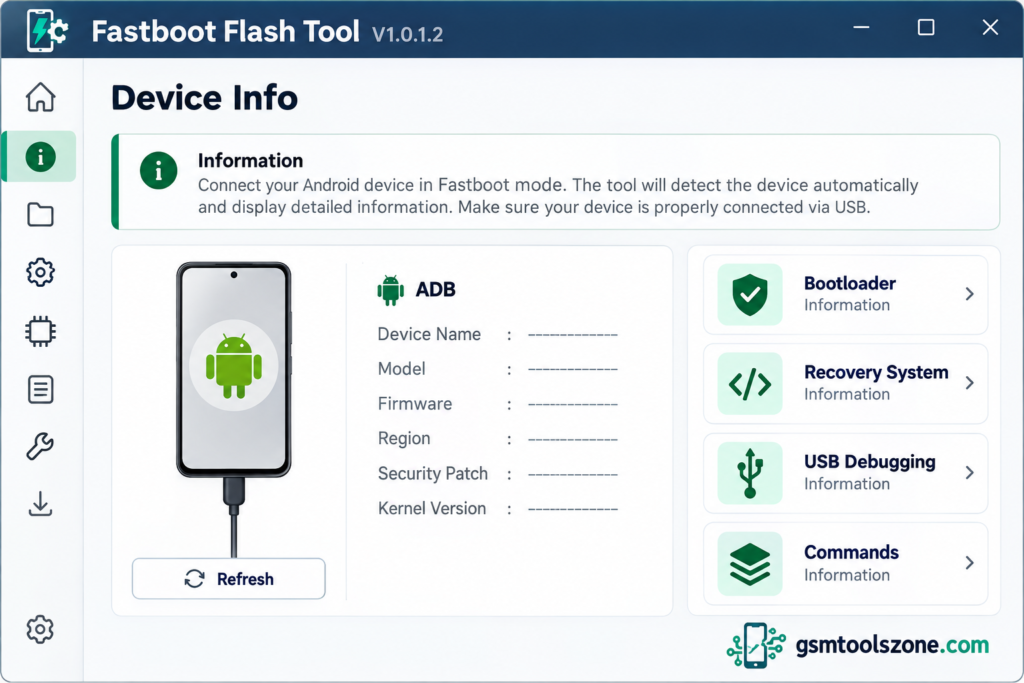
What is Fastboot Flash Tool V1.0.1.2?
Fastboot Flash Tool V1.0.1.2 is a Windows-based tool. It is especially designed to help users manage and repair supported Android smartphones. Fastboot Flash Tool V1.0.1.2 also provides options for checking device information, managing partitions, opening BAT and Scatter files, and switching to EDL mode on supported devices.
Features
Fastboot Firmware Flashing:
Fastboot Flash Tool V1.0.1.2 helps users flash compatible firmware on supported Android devices through Fastboot mode. This feature can be useful when reinstalling system software or fixing certain firmware-related problems.
Partition Management:
The tool provides partition-related options for supported devices. Users can work with partitions such as boot, recovery, system, and vendor when the device and firmware package support these operations.
Stock Firmware Restoration:
If an Android phone has firmware problems or an unsuccessful software update, the tool may help restore compatible stock firmware. The correct firmware files are required for the specific device model.
Fastboot Error Fix:
Fastboot Flash Tool V1.0.1.2 includes an error-fixing option that can help users troubleshoot certain Fastboot-related issues. The results depend on the device, connection, drivers, and type of error.
Fastboot to EDL:
This feature provides a Fastboot-to-EDL option for compatible devices. EDL (Emergency Download Mode) is used on supported Qualcomm devices for certain low-level firmware servicing and recovery tasks.
Fastboot Device Information:
The Fastboot Info option helps users check available information about a connected device. This can be useful for identifying the device’s status before starting firmware-related operations.
Scatter File Support:
The tool includes an Open Scatter File option for working with compatible scatter-based firmware packages. Scatter files are commonly associated with MediaTek devices, but compatibility depends on the tool and device.
BAT File Support:
The Open BAT File option allows users to open supported batch files used for firmware-related operations. These scripts can help run predefined commands when the device and flashing procedure are compatible.
Fastboot FRP Lock Option:
The tool includes a Fastboot FRP Lock option for supported devices. Its availability and function may vary depending on the device model and software version.
Simple Windows Interface:
Fastboot Flash Tool provides a straightforward interface for accessing its available functions. This makes it easier for mobile technicians and experienced Android users to locate the required options.
No Dedicated Flash Box Required:
The tool is designed to run on a Windows computer and communicate with supported devices through a USB connection. A dedicated flashing box or dongle may not be required, although compatible drivers and other requirements can vary.
Support for Different Android Devices:
The tool is intended for compatible Android devices that support its available Fastboot operations. Actual support depends on the manufacturer, device model, chipset, firmware package, and bootloader status.
Pros and Cons
Pros
- Simple and easy-to-use interface.
- Supports firmware flashing on compatible Android devices.
- Includes partition management options.
- Provides Fastboot error-fixing features.
- Offers Fastboot-to-EDL functionality for supported devices.
- Supports compatible BAT and Scatter files.
- Runs on a Windows computer.
- May not require a dedicated flashing box or dongle.
Cons
- Requires compatible USB drivers and a stable connection.
- Not all Android brands and models are supported.
- Incorrect firmware can cause serious software problems.
- Some features may not work on locked bootloaders.
- Flashing operations can erase user data.
- Advanced functions may require technical knowledge.
System Requirements
| Requirements | Details |
|---|---|
| Operating System | Windows 7, 8, 10, or 11 |
| Processor | Intel or AMD Processor |
| RAM | 4 GB or more |
| Storage | At least 1 GB of free space |
| USB Cable | Compatible USB data cable |
| USB Drivers | Required drivers for the connected Android device |
How to download Fastboot Flash Tool V1.0.1.2?
- Visit the official website download page for Fastboot Flash Tool V1.0.1.2.
- Find the download button available on the page.
- Click the button to download the tool file to your computer.
- Once the download is complete, open your Downloads folder and locate the downloaded file.
- If the file is compressed in ZIP format, extract it using a suitable extraction program.
- Read any included instructions before running the tool.
- Install the required USB drivers for your Android device, if needed.
Setup Download Information
- File Version: V1.0.1.2
- File Size: 7.24 MB
- File Password: gsmtoolszone.com
- Download Link👇
Conclusion
Fastboot Flash Tool V1.0.1.2 is a professional Windows software. This tool supports boot flashing, partition management, device information, Scatter and BAT file support, and Fastboot-to-EDL options, making firmware servicing easier. It has a simple interface, whether you are a beginner or an expert. You can download this tool and solve your problems with just one click.
FAQs
Is Fastboot Flash Tool free to use?
The availability and licensing terms depend on the source providing the tool. Check the download page for accurate information.
Does Fastboot Flash Tool support all Android phones?
No. Support depends on the phone model, chipset, bootloader, firmware, and the features available in the tool.
Does Fastboot Flash Tool require USB drivers?
Yes, compatible USB drivers may be required so Windows can communicate properly with the connected Android phone.
One Comment
Comments are closed.