HakinTool V2 Free Download for Multi-Brand Android Servicing (2027)
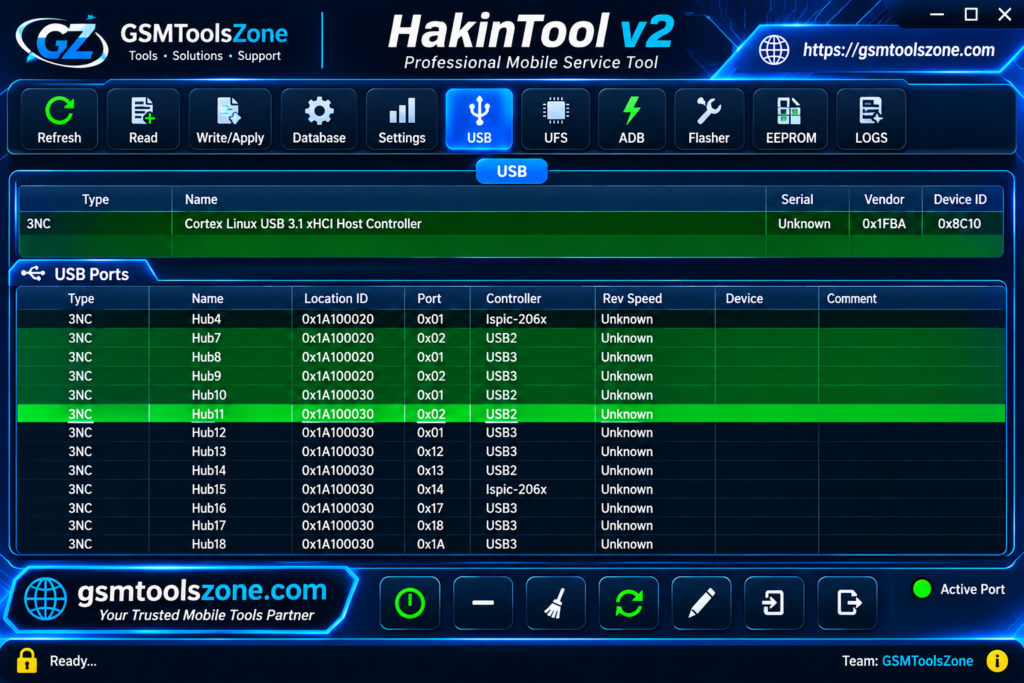
Android servicing and Hackintosh configuration can be challenging when users need multiple tools to handle different tasks. HakinTool v2 provides an all-in-one solution through a Windows-based interface that combines Android servicing and Hackintosh configuration features in one place. HakinTool v2 supports various operations, including Firmware Flashing, Partition Management, FRP, Fastboot, MDM, and KG-related functions. For Hackintosh users, it also offers tools for Intel Framebuffer Configuration, USB Port Mapping, Audio Layout ID adjustment, PCI Device Inspection, and system information monitoring.
Also Use: QSF Tool V1.0 Free Download for Samsung Qualcomm FRP Bypass (2027)
What is HakinTool v2?
HakinTool v2 is an all-in-one Windows-based software designed for Android servicing and Hackintosh configuration. HakinTool v2 offers multiple tools in one interface, helping users perform mobile repair and system customization tasks without installing multiple applications. For Android devices, HakinTool v2 offers features such as Firmware Flashing, FRP, Fastboot, Partition Management, MDM, and KG-related operations. It also includes useful Hackintosh tools for Intel Framebuffer Configuration, USB Port Mapping, Audio Layout IDs, and PCI Device Inspection.
Features
Device Information:
Displays basic information about connected Android devices through supported ADB and other connection modes.
Samsung FRP Support:
Includes dedicated FRP-related functions for supported Samsung and Exynos devices.
Screen PIN Management:
Provides options to create, set, and remove screen PINs on supported devices.
Motorola Fastboot:
Supports reading device information and managing bootloader lock and unlock operations through Fastboot mode.
Xiaomi Fastboot Flashing:
Allows users to select Fastboot ROM files, check device models, and perform supported firmware flashing operations.
Google Pixel Support:
Includes Fastboot and server-based functions for supported Google Pixel devices.
MediaTek BROM Operations:
Provides BROM-based servicing options, including supported partition and SUPER partition operations.
Tecno and Infinix Meta Mode:
Supports device information reading and partition inspection through Meta Mode on compatible devices.
Partition Management:
Allows users to read, write, dump, and repack supported partitions. It also includes a SUPER partition explorer.
IMEI Management:
Offers single and dual IMEI reading and writing options through supported ADB and Diag connection modes. Use these functions only for legally authorized device repairs.
Unisoc Diag Support:
Helps detect Unisoc diagnostic ports and access available software information and partition operations.
Brand-Specific Patches:
Includes different patch options for supported Samsung, Honor, Xiaomi, Realme, Motorola, Tecno, and Infinix devices.
Hackintosh System Information:
Displays hardware details such as CPU, GPU, RAM, displays, and connected devices.
Intel Framebuffer Patching:
Helps configure Intel integrated graphics properties, connectors, and framebuffer settings for macOS compatibility.
USB Port Mapping:
Helps identify connected USB devices and configure USB ports for better Hackintosh compatibility.
Audio Layout ID Patching:
Provides AppleALC audio layout configuration options to help enable onboard audio on supported Hackintosh systems.
PCI Device Monitoring:
Displays information about PCI devices, including graphics cards, network adapters, and other hardware components.
Graphics and Display Configuration:
Provides options to inspect graphics and displays to help troubleshoot hardware compatibility and screen-related issues.
Pros and Cons
Pros
- Combines Android servicing and Hackintosh tools in one application.
- Supports multiple Android brands and chipsets.
- Includes Samsung FRP and Motorola Fastboot functions.
- Offers MediaTek BROM and Unisoc Diag support.
- Provides useful partition management options.
- Includes Intel Framebuffer and USB Mapping tools.
- Supports Hackintosh audio and graphics configuration.
- The latest version works online without DNS or a VPN.
- Listed functions are currently available without credits or usage limits.
Cons
- Requires an active internet connection for online functions.
- Some features work only with supported device models.
- Users may need specific USB drivers and connection modes.
- Hackintosh configuration requires basic technical knowledge.
- Not all functions are available for every Android device.
System Requirements
| Requirement | Details |
| Operating System | Windows 7, 8, 10, or 11 |
| RAM | 4 GB |
| Processor | Intel or AMD |
| Storage | 1 GB Free Space |
| Internet | Required for online functions |
| USB Connection | Required for Android devices |
How to download HakinTool v2?
- Visit the official website to find the latest available version of HakinTool v2.
- Find the HakinTool V2 download section and click the download button.
- Wait for the download process to finish.
- Extract the downloaded ZIP file using WinRAR or 7-Zip, if required.
- Open the extracted folder and run the HakinTool application.
Setup Download Information
- File Version: v2
- File Size: 178.7 MB
- File Password: ❌None
- Download Link👇
Conclusion
HakinTool v2 is a useful all-in-one utility for Android servicing and Hackintosh configuration. It brings several important functions together, including FRP, Fastboot, firmware flashing, partition management, and diagnostic operations for supported Android devices. It also helps Hackintosh users manage Intel graphics, USB mapping, audio settings, and hardware information. Its online working system and multiple configuration options make it a practical choice for mobile repair technicians and macOS customization users. It’s easy to run this tool whether you are a beginner or an expert.
FAQs
Does HakinTool support MediaTek devices?
Yes. HakinTool includes MediaTek BROM and Meta Mode functions for supported devices. It also provides options for partition management and other servicing operations.
Can HakinTool remove Samsung FRP?
HakinTool includes Samsung FRP-related functions for supported models. Results may depend on the device model, Android version, and security patch.
Can I flash Xiaomi firmware with HakinTool?
Yes. HakinTool includes Xiaomi Fastboot flashing options. Users can select a compatible Fastboot ROM and perform supported flashing operations.
Can HakinTool manage Android partitions?
Yes. Its partition management features include reading, writing, dumping, and repacking supported partitions. It also provides a SUPER partition explorer.
Does HakinTool automatically fix Hackintosh problems?
No. Its configuration tools help users inspect and adjust system settings, but they do not automatically fix every Hackintosh issue. Some technical knowledge is required.

One Comment
Comments are closed.