IMEI Write Tool R3.0.0001 Full Activated Version 2026
IMEI problems on an Android smartphone, tablet, or feature phone are difficult to resolve, especially when the IMEI, Serial Number, Bluetooth Address, or Wi-Fi Address is missing or incorrect. Writing or repairing the IMEI on MediaTek (MTK) and Spreadtrum/Unisoc devices can also be difficult without the right utility. IMEI Write Tool R3.0.0001 provides a simple solution for supported devices. It is a free Windows-based IMEI repair utility that helps users write or repair IMEI numbers and fix related device information.
Also Use: SK Unlocker Tool v23 Download for Windows Latest Version [2026]
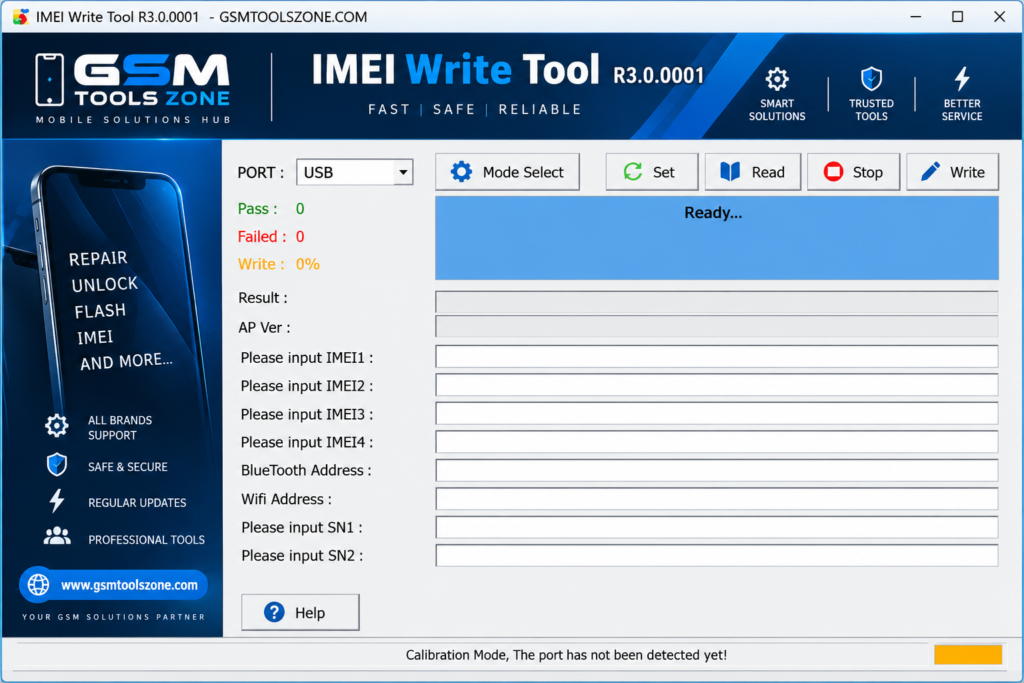
What is IMEI Write Tool R3.0.0001?
IMEI Write Tool is a lightweight Windows-based software. It is especially designed to help repair and write IMEI information on supported mobile devices. IMEI Write Tool R3.0.0001 supports smartphones, feature phones, and tablets powered by MediaTek (MTK) and Spreadtrum/Unisoc chipsets. IMEI Write Tool R3.0.0001 is used to write or repair the IMEI number and, on supported devices, manage other device information such as the Bluetooth Address, Wi-Fi Address, and Serial Number (SN). It has a simple interface easy to use for every user.
Features
IMEI Writing:
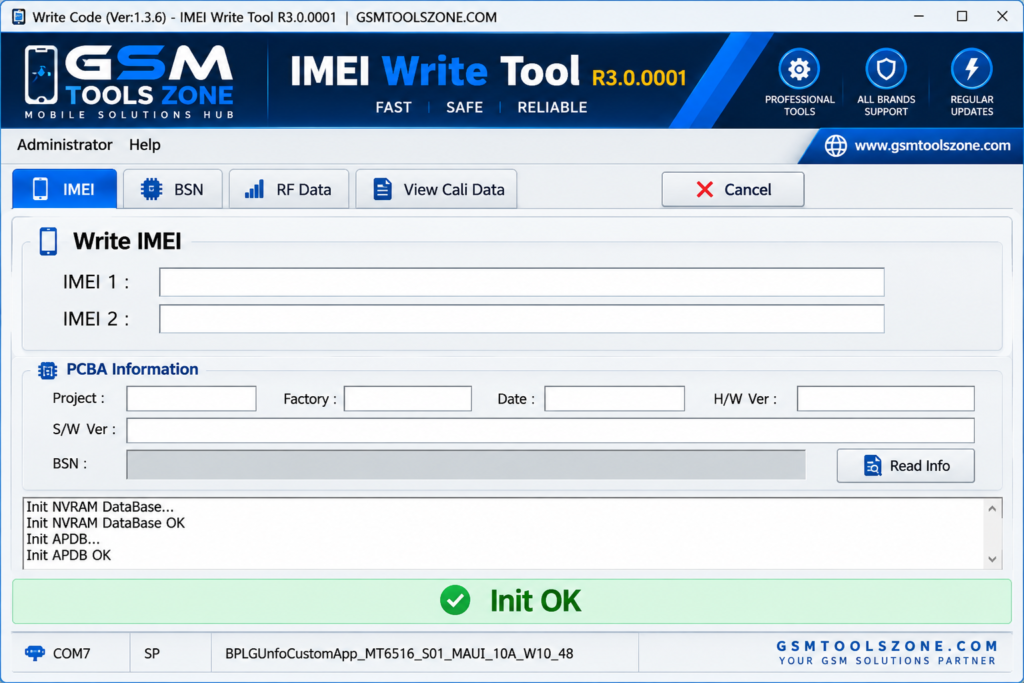
IMEI Write Tool R3.0.0001 allows users to write or repair the IMEI number on supported MediaTek (MTK) and Spreadtrum/Unisoc devices. This can be useful when device information is lost or corrupted after certain software-related issues.
Single IMEI Support:
The tool can handle a single IMEI on supported smartphones, feature phones, and tablets. Users can enter the required IMEI information and perform the process through the Windows application.
Multiple IMEI Support:
For supported dual-SIM or multi-IMEI devices, IMEI Write Tool R3.0.0001 can work with multiple IMEI entries. This makes the process more convenient when a device requires more than one IMEI.
Normal and Calibration Modes:
IMEI Write Tool R3.0.0001 provides different connection modes for supported devices. Depending on the chipset and device, users can use the normal or calibration mode to communicate with the phone.
Custom IMEI Entry:
The tool allows users to enter IMEI information manually when required for supported devices. Always use the legally assigned IMEI for the device and avoid changing an original IMEI without proper authorization.
MTK and Unisoc Compatibility:
IMEI Write Tool supports selected devices powered by MediaTek (MTK) and Spreadtrum/Unisoc chipsets. Compatibility can vary depending on the phone model, chipset, and software configuration.
Read Existing IMEI:
On supported devices, the tool can read existing IMEI information. This helps technicians check the device information before starting a repair or writing process.
IMEI Restoration:
IMEI Write Tool can help restore the original IMEI information on supported devices when it has been lost or damaged. This makes it useful for mobile repair technicians working with compatible devices.
Bluetooth and Wi-Fi Address Support:
In addition to IMEI, the tool can work with other device identifiers such as the Bluetooth Address and Wi-Fi Address on supported models.
Serial Number Support:
IMEI Write Tool also provides support for the Serial Number (SN) on compatible devices. This gives technicians additional options when repairing supported devices.
Pros and Cons
Pros
- Free to use
- Simple and lightweight tool
- Supports MTK and Unisoc devices
- Can write and repair IMEI
- Supports multiple IMEI entries on compatible devices
- Can read existing IMEI information
- Supports Bluetooth and Wi-Fi Address repair on supported devices
- Works with smartphones, tablets, and feature phones
Cons
- Only works with supported devices and chipsets
- Requires a Windows PC
- Some features may not work on every device
- Correct drivers may be required for device connection
- IMEI changes should only be performed when legally permitted
System Requirements
| Requirements | Details |
|---|---|
| Operating System | Windows 7, 8, 10, or 11 |
| Processor | Intel or AMD processor |
| RAM | 2 GB or more |
| Storage | At least 100 MB free space |
| USB Port | Required for connecting the mobile device |
How to download IMEI Write Tool R3.0.0001?
- Download the IMEI Write Tool R3.0.0001 ZIP file from the official website.
- Extract the downloaded file.
- Open the extracted folder and run the setup.
- After installation, open IMEI Write Tool R3.0.0001.
- Connect your Android phone with a USB cable.
- You are now ready to use the tool.
Setup Download Information
- File Version: R3.0.0001
- File Size: 1.31 MB
- Download Link👇
Conclusion
IMEI Write Tool is a useful option for users and mobile technicians who need to manage IMEI and other device information on supported phones. You can flash a single IMEI and multiple IMEIs. Its simple interface makes it easier to work with compatible devices without any difficulty. Before using this tool, make sure your device and chipset are supported.
FAQs
Is IMEI Write Tool free?
Yes, IMEI Write Tool is available as a free utility.
Can IMEI Write Tool repair IMEI?
Yes, it can help write or restore IMEI information on supported devices.
Do I need USB drivers to use IMEI Write Tool?
Yes, the correct device drivers may be required so the Windows PC can properly detect the connected phone.

![FRT Tool v1.7.5 Download Latest Version Fully Activated [2026]](https://gsmtoolszone.com/wp-content/uploads/2026/08/frt-tool-v1-7-5-2026-768x576.png)